
Online Cashier Payment
Cashier Payment occurs when a consumer purchases the merchandise on a merchant platform and the consumer is redirected to the page of the Mobile Payment Provider (MPP) (normally, a digital wallet) to complete the payment.
When an Acquiring Service Provider (ACQP) initiates a payment request to Alipay+, Alipay+ returns a payment URL of the MPP to the ACQP. The MPP renders the cashier page when the consumer is redirected to the payment URL and then the consumer confirms to pay.
Basic concepts
Term (Abbreviation) | Definition |
Acquiring Service Provider (ACQP) | An Acquiring Partner participating in Alipay+ Core or other acquirer cooperating with a member of Ant Group to enable payments. |
Alipay+ | Alipay+ solution is a collaborative effort along with all partners to provide more open, digitalized, and inclusive financial services to worldwide consumers and merchants. |
Cashier Payment | An Online Payment product provided by Alipay+, whereby a Merchant redirects a User to the payment page of a MPP to confirm the Transaction details and Authorise the Payment. |
Merchant | A person that enters into a Transaction with a User which is acquired by an ACQP or an Indirect ACQP, as applicable. |
Mobile Payment Provider (MPP) | A MPP participating in Alipay+ Core or other user- or issuer-facing payment service provider cooperating with a member of Ant Group to enable payments. |
QR Code | Quick response code as defined in ISO/IEC 18004. |
Code value | Data that are encoded and stored in the QR code or barcode. |
User experience
With Alipay+ Cashier Payment, consumers can place an order on a merchant platform and select a payment method on the merchant's cashier page to initiate a payment request.
The merchant platform may be a PC website (Web) or a mobile app/WAP page (Mobile). The subsequent user experience varies by platform.
- Web: The consumer is redirected to a page displaying a QR code. The payment experience depends on the wallet's code-scanning capability:
- If code scanning is supported: The consumer scans the QR code using the wallet app and completes the payment within the app. See Scenario 1 and Scenario 2 in the Web section.
- If code scanning is not supported: The consumer is redirected through a series of web pages to log in and complete the payment on the wallet's web interface. See Scenario 3 in the Web section.
- Mobile: The consumer is redirected directly to the wallet app or WAP page to complete the payment. See the Mobile section.
Web
Scenario 1: Alipay+ QR code mode
In this scenario, the consumer is redirected to the Alipay+ cashier page, where Alipay+ renders the QR code.
The following figure illustrates the user experience of Alipay+ QR code mode.
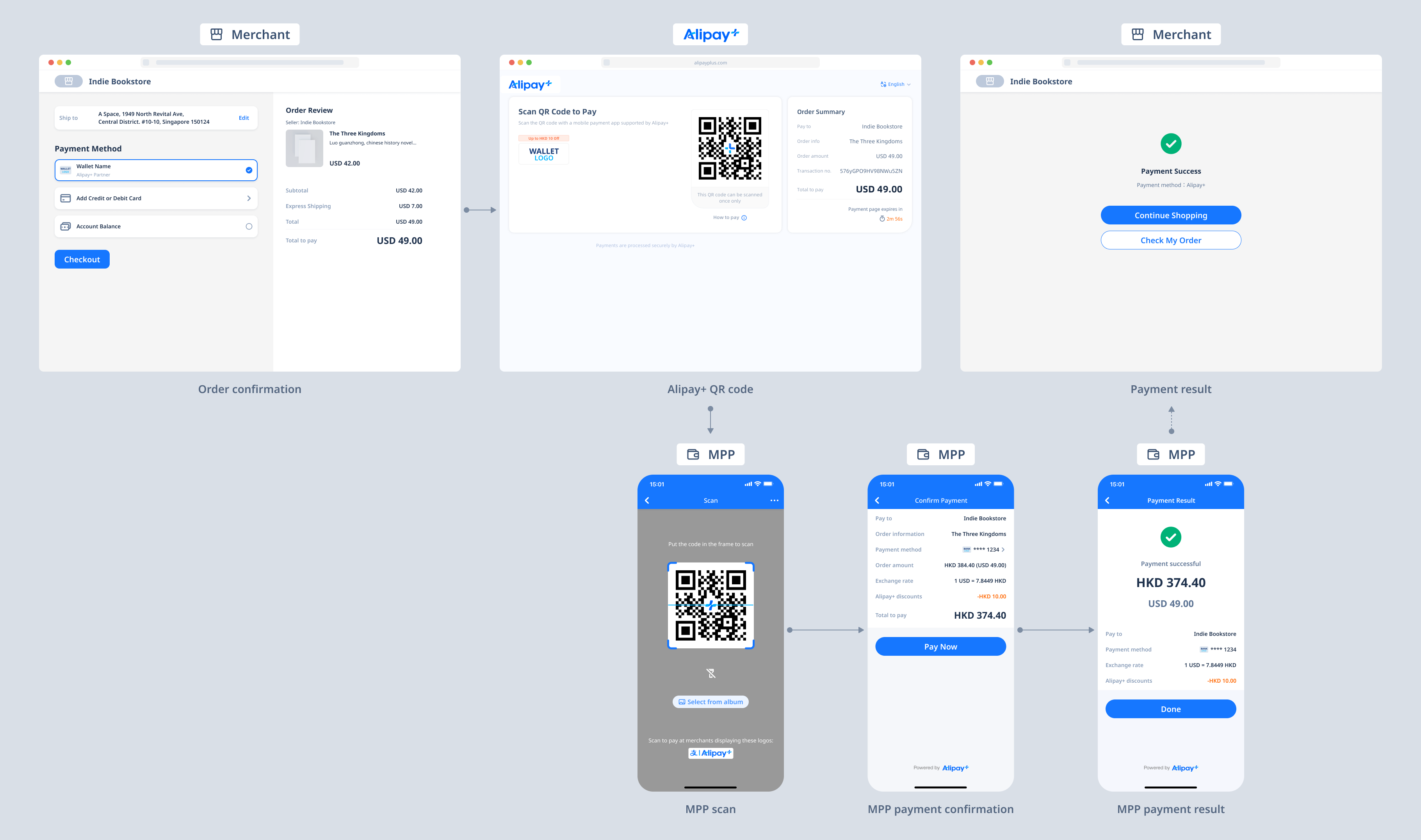
The user experience consists of the following steps:
- The consumer selects a wallet from the payment method list on the merchant's cashier page.
- The consumer is redirected to a page displaying an Alipay+ QR code and uses the wallet app to scan it.
- The consumer is redirected to the payment confirmation page within the wallet app and completes the payment.
- The consumer is redirected back to the merchant's result page.
Scenario 2: Merchant QR code mode
In this scenario, the merchant renders the QR code using the code value provided by Alipay+.
Note: The merchant must follow Alipay+ UX designs when displaying the QR code.
The following figure illustrates the user experience of merchant QR code mode.
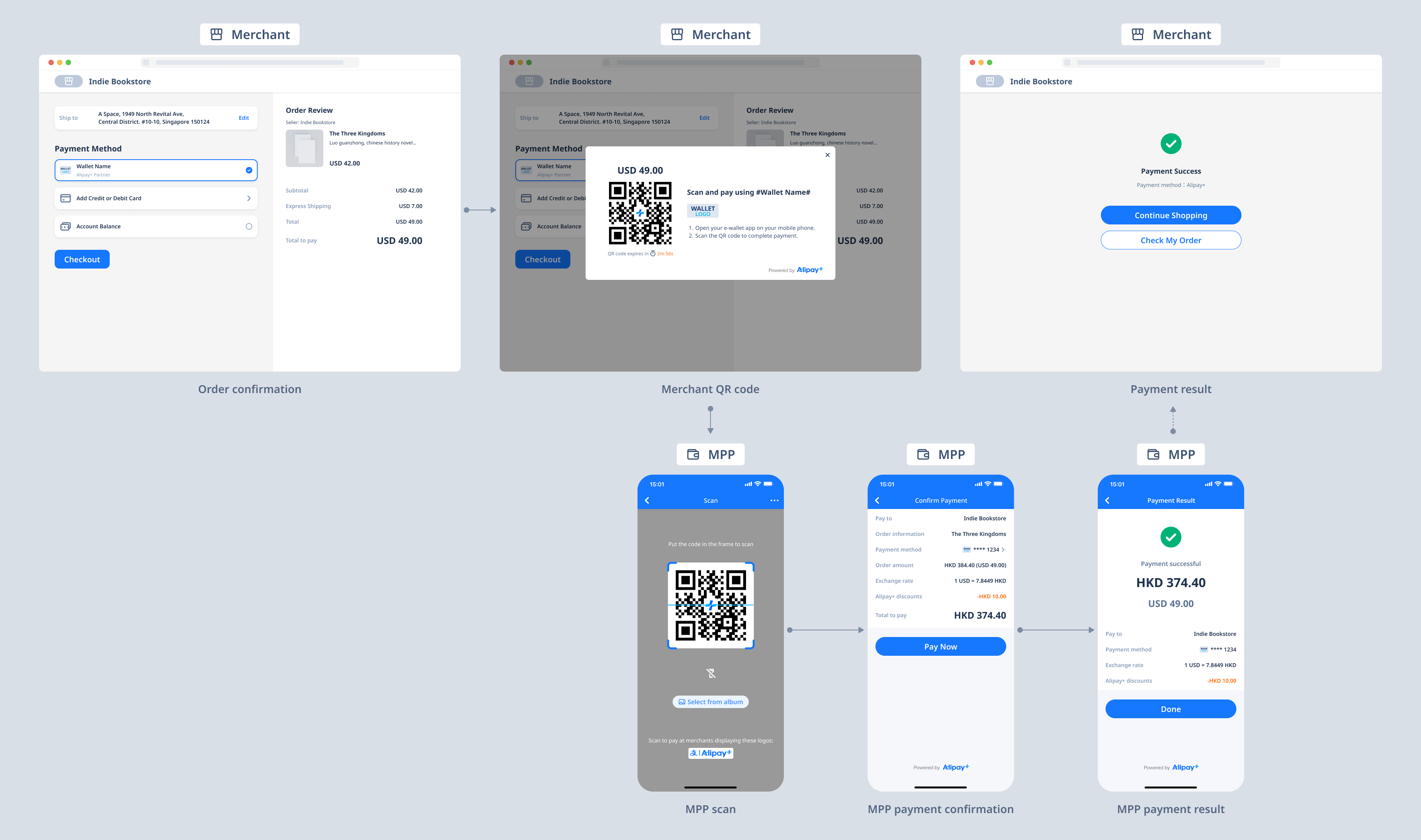
The user experience consists of the following steps:
- The consumer selects a wallet from the payment method list on the merchant's cashier page.
- The consumer is redirected to a page displaying the merchant QR code and uses the wallet app to scan it.
- The consumer is redirected to the payment confirmation page within the wallet app and completes the payment.
- The consumer is redirected back to the merchant's result page.
Scenario 3: Wallet without code-scanning support
The following figure illustrates the user experience when code scanning is not supported.
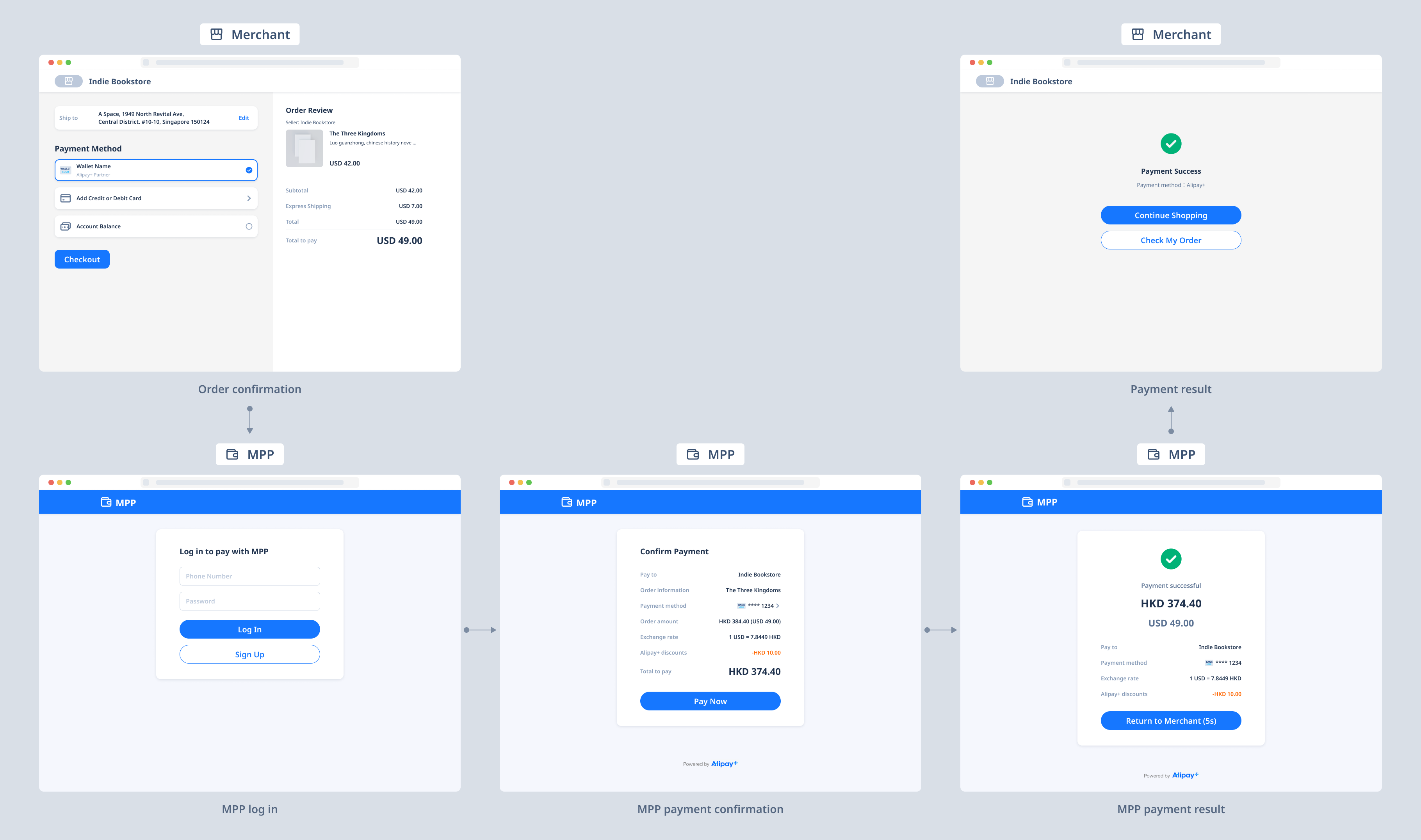
The user experience consists of the following steps:
- The consumer selects a wallet on the merchant's cashier page.
- The consumer is redirected to the wallet's web login page and completes the payment through the wallet's web interface.
- The wallet displays the payment result.
- The consumer is redirected back to the merchant's payment result page.
Mobile
In this scenario, the consumer is redirected to the wallet app or WAP page to complete the payment.
The following figure illustrates the user experience on mobile.
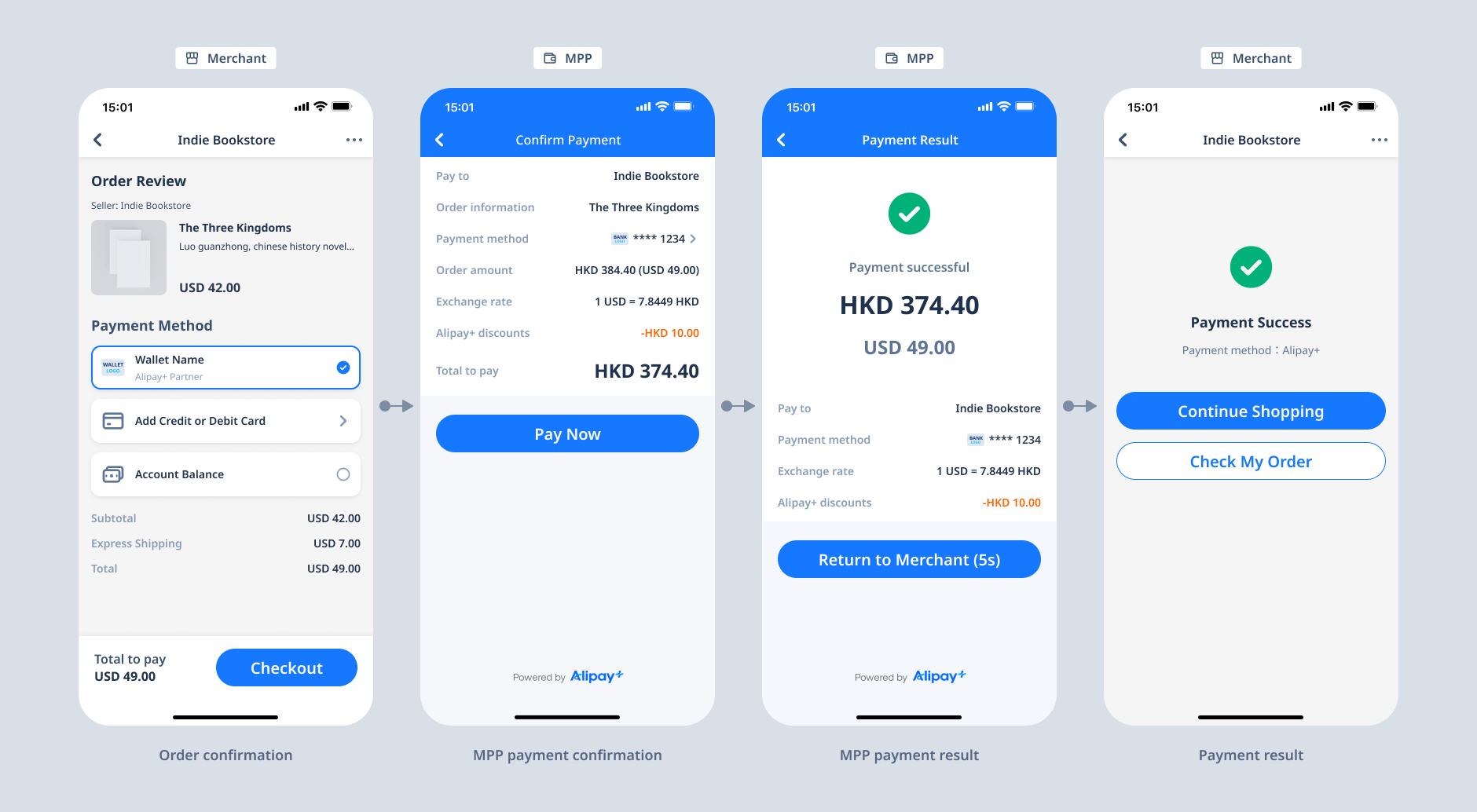
The user experience consists of the following steps:
- The consumer places an order in the merchant's app or WAP page and selects a wallet for payment.
- The merchant redirects the consumer to the wallet's payment confirmation page (app or WAP), where the payment is completed.
- The consumer is redirected back to the merchant's payment result page.
Note: If the merchant launches the wallet app from a WAP page, the wallet may not be able to redirect the consumer back to the merchant. For implementation details on redirection between merchant and wallet, contact connect_support@service.alipay.com.
Product functionalities
- Accept a payment: The ACQP takes a series of integration steps to ensure the consumer completes the payment.
- Easy redirection: Alipay+ provides the appropriate redirection URL, enabling merchants to seamlessly redirect customers to their wallet for payment.
- Payment result inquiry: After initiating a payment request, the ACQP can query the status of the payment.
- Payment result notification: When the wallet confirms a successful payment, Alipay+ proactively sends the payment result to the ACQP. The ACQP can then forward the result to the merchant according to its business logic.
How it works
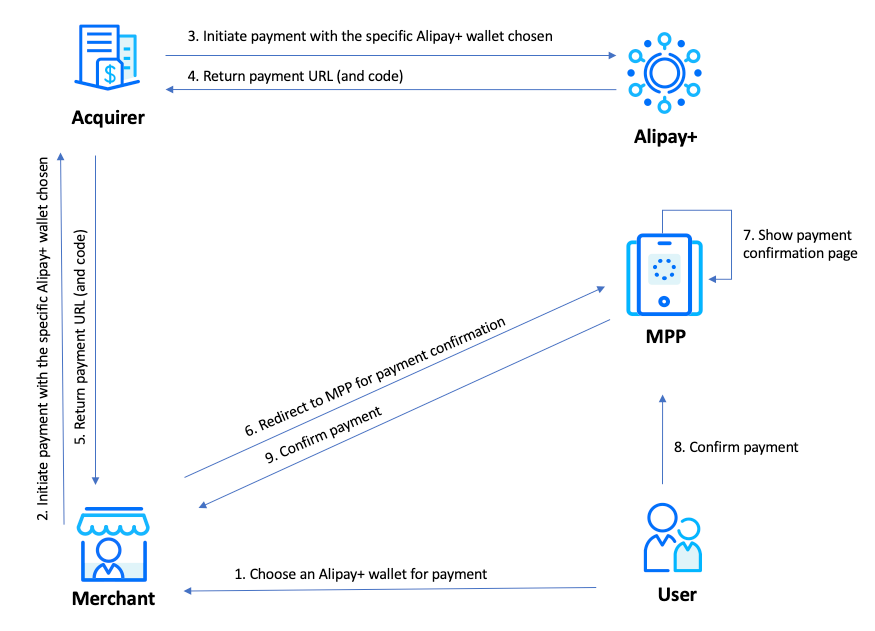
The following figure illustrates the Cashier Payment workflow:
- The user selects a payment method to make a payment. (Step 1)
- Your client side calls your server side to initiate a payment. (Step 2)
- Your server side calls the pay API to submit the order to Alipay+. (Step 3)
- Alipay+ returns the payment URL (and code) to your server side, which forwards it to your client side. (Steps 4–5)
- Using the payment URL (and code), your client side redirects the user to the MPP's payment confirmation page, where the user confirms and completes the payment. (Steps 6–9)
Get started
To access this product, submit your information and our team will contact you.
To start integrating Alipay+, see Get started with Alipay+ integration.
For more information about integrating the Cashier Payment functionalities, see Integration guide for Cashier Payment.