
User activation (Alipay+ NFC pages)
This guide describes the final step of the silent activation process.
Before you begin
- Ensure that you have already implemented the activation preparation process.
- Understand that you will use the Alipay+ SDK's pre-built pages for the user interface.
Workflow
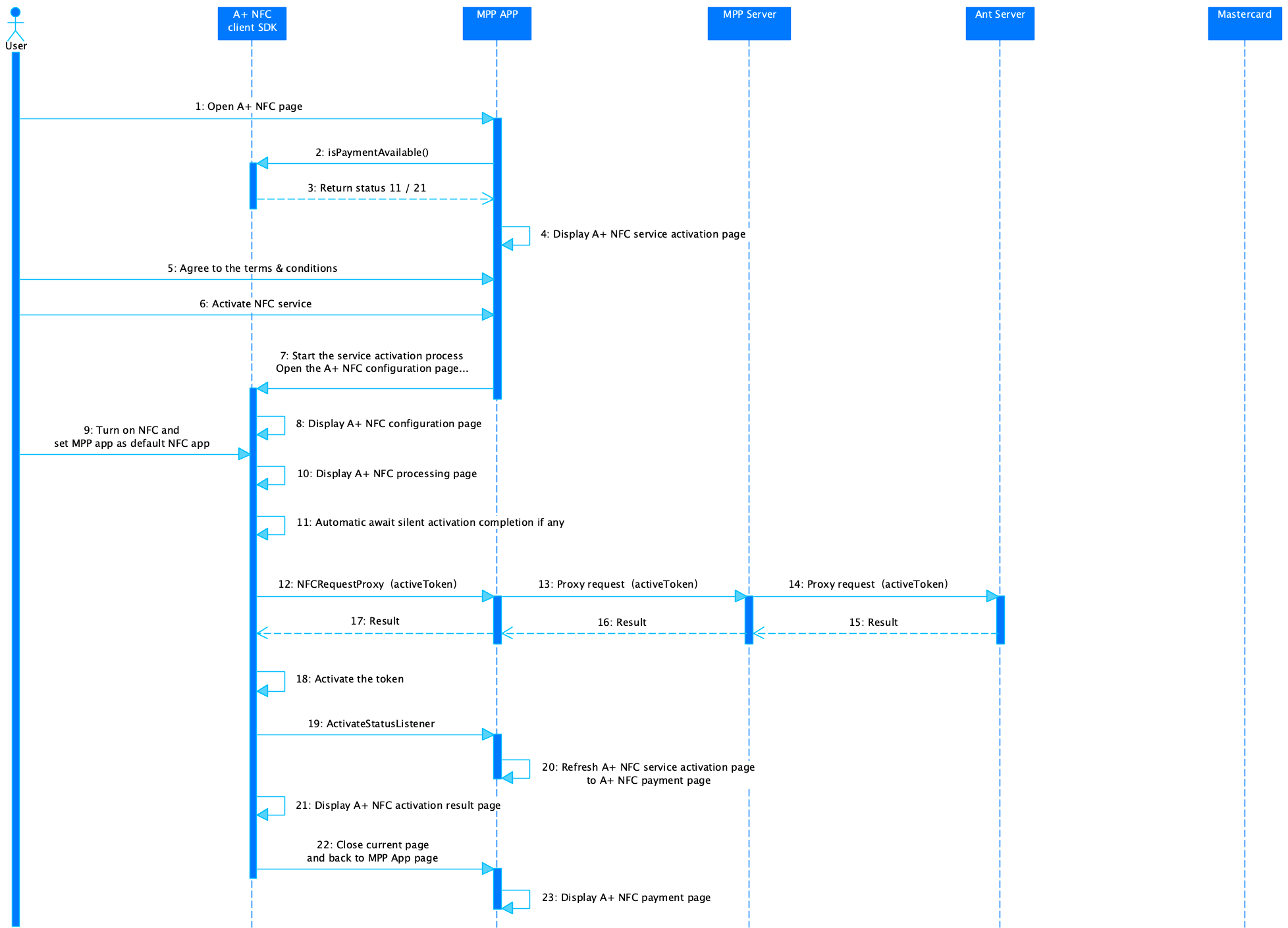
The user activation consists of the following steps:
- The user opens the Alipay+ NFC page. (Step 1)
- The MPP app calls the isPaymentAvailable() API of the Alipay+ NFC SDK to determine if the payment function is available. If the silent activation process is finished, the SDK returns
11or21as the token status to the MPP app. (Step 2-3) - The MPP app displays the Alipay+ NFC service activation page to the user. (Step 4)
- The user agrees to the terms and conditions and chooses to activate the NFC service. (Steps 5-6)
- The MPP app starts the service activation process by opening the Alipay+ NFC configuration page by calling the ApplyCardActivity.apply() API. The SDK displays the Alipay+ NFC configuration page for the user to turn on the NFC function and set the MPP app as the default NFC app. (Steps 7-9)
- The SDK displays the Alipay+ NFC processing page to the user. And if the silent activation is not complete, the SDK waits till the silent activation completes. (Steps 10-11)
- The SDK sends a request to the Ant server to activate the token on the server side. (Steps 12-17)
- The SDK activates the local token. ActivateStatusListener is triggered, causing the MPP app to refresh the Alipay+ NFC service activation page to the Alipay+ NFC payment page. (Steps 18-20)
- The SDK displays the Alipay+ NFC activation result page. (Step 21)
- The SDK closes the current page and switches back to the MPP app page. The MPP app displays the Alipay+ NFC payment page. (Steps 22-23)
Step 1: Render the Alipay+ NFC page
The user opens the Alipay+ NFC page within the MPP app.
Step 2: Verify payment function availability
1. Call the isPaymentAvailable() API of the Alipay+ SDK to check if the payment function is available.
2. If the silent activation process is finished, the SDK returns 11 or 21 as the token status to you.
Processing logic
When calling the isPaymentAvailable() API, take the following into consideration:
- Handle the response parameter properly:
- result: The token status code. For the code and corresponding token status, see Token status.
For more information about how to use the isPaymentAvailable() API on an Android device, see the isPaymentAvailable API.
Step 3: Activate Alipay+ NFC service
1. Display the Alipay+ NFC service activation page to the user.
2. The user agrees to the terms and conditions and chooses to activate the NFC service.
3. Start the service activation process by opening the Alipay+ NFC configuration page by calling the ApplyCardActivity.apply() API. The SDK displays the Alipay+ NFC configuration page to the user.
4. The user turns on the NFC function and sets your app as the default NFC app.
Processing logic
When calling the ApplyCardActivity.apply() API, take the following into consideration:
- Configure the request parameters properly:
- activity: The context of the current activation page.
- requestCode: The code that will be returned to
onActivityResult()to identify this card application request. - apduServiceName: The customized APDU service name during integration.
For more information about how to use the ApplyCardActivity.apply() API on an Android device, see the ApplyCardActivity.apply() API.
Step 4: Process activation and token management
1. The SDK displays the Alipay+ NFC processing page to the user. If the silent activation is not complete, the SDK pauses here until it is completed.
2. The SDK sends an activeToken request to you via the NFCRequestProxy SPI. Then you need to proxy the request to the Ant server.
3. The Ant server returns the server-side token activation result to the SDK.
4. The SDK activates the local token. The ActivateStatusListener is triggered, causing your app to refresh from the Alipay+ NFC service activation page to the Alipay+ NFC payment page.
Step 5: Display activation result
1. The SDK displays the Alipay+ NFC activation result page.
2. The SDK closes the current page and switches back to your app's page. Your app displays the Alipay+ NFC payment page.
Token status
Code | Token status |
-2 | Disconnected. |
-1 | Query failed. |
0 | The card does not exist. |
1 | The card exists, but there are no credentials. Call the replenish API to replenish credentials. |
2 | Payment is allowed. |
3 | The card is locked. Call the unlock API to unlock. |
4 | The card is locked locally. Call the localUnlock API to unlock. |
11 | The card is in activation. |
21 | The card is activated successfully but requires secondary confirmation. |