
Transport Code integration
This topic describes Alipay+ Transport Code features and explains how to integrate them.
Before you begin
Before you learn more about how to integrate with Alipay+ Transport Code, ensure that you are familiar with the following things:
- The user experience for Alipay+ Transport Code.
- The preconditions required for integration.
- The SOP for the full integration process.
Enable the Transport Code service
Before using the Transport Code service, the user must enable it. This section introduces how to enable the Transport Code service.
Workflow
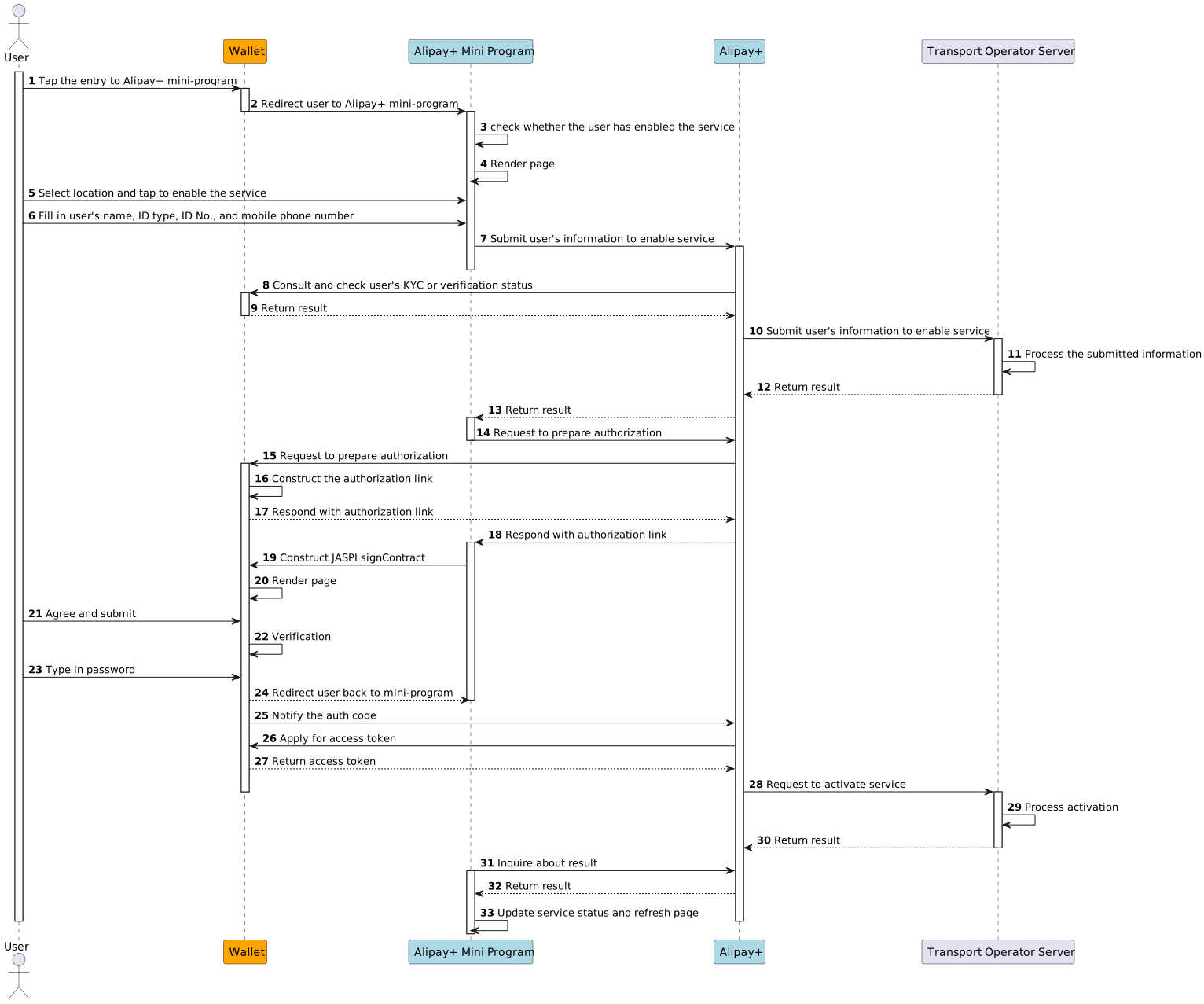
The following figure illustrates the workflow of enabling the Transport Code service.
Note: The Alipay+ Cross-border Transport mini program is referred to as the Alipay+ mini program from this point forward.
Operation steps
- The user enters the Alipay+ Cross-border Transport mini program from the cross-border zone of the wallet and selects the Transport Code for the corresponding country and city.
- According to the public transport operator's requirements, the user fills in their personal information, including name, certification type and ID, and mobile phone number.
Note:
- The name must be consistent with the ID document, such as the passport and the Mainland Travel Permit for Hong Kong and Macao Residents.
- The mobile phone number can be obtained from the wallet and automatically filled in. For more information, see Support user to authorize mobile phone number to Alipay+ when enabling the service.
- According to the regulations of the wallet's jurisdiction and the destination jurisdiction, the wallet verifies that the user meets the conditions for cross-border payments.
Note: The user must complete the eKYC verification and reach the required eKYC level. For more information, see Guide the user to complete eKYC verification when enabling the service.
- The user agrees to and signs the Auto Debit agreement to enable the service.
Generate a Transport Code
This section introduces how to generate a Transport Code.
Workflow
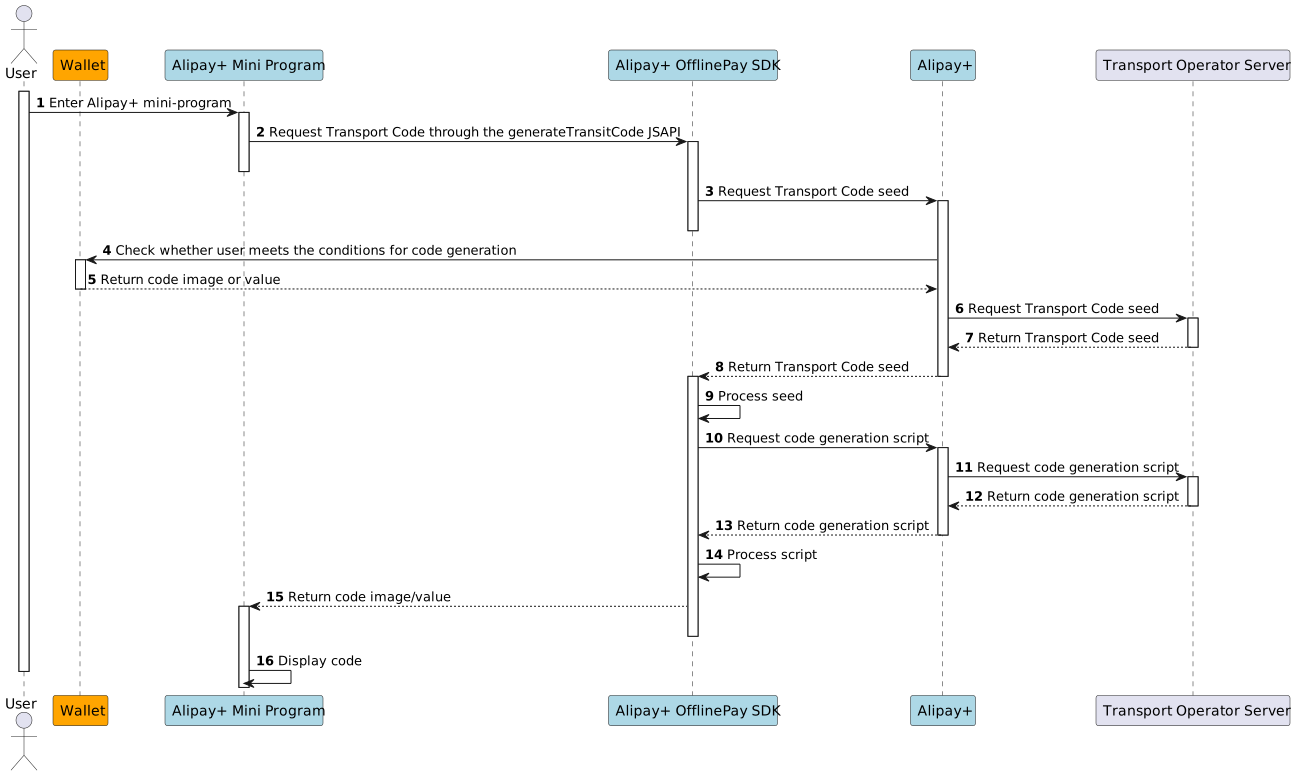
The following figure illustrates the workflow of generating the Transport Code.
Operation steps
- The user enters the Alipay+ Mini Program homepage from the cross-border zone of the wallet. Note that the user will automatically be redirected to the homepage after successfully enabling the Transport Code service.
- The Alipay+ mini program requests the Alipay+ OfflinePay SDK to generate the Transport Code through the generateTransitCode JSAPI.
- Alipay+ inquires the wallet about whether the user meets the conditions for code generation.
- Alipay+ OfflinePay SDK obtains a Transport Code seed and a code generation script from the public transport operator.
- Alipay+ OfflinePay SDK generates the Transport Code and returns it to the Alipay+ mini program.
Scan the Transport Code to start the ride
This section introduces how to scan the Transport Code to start the ride.
Workflow
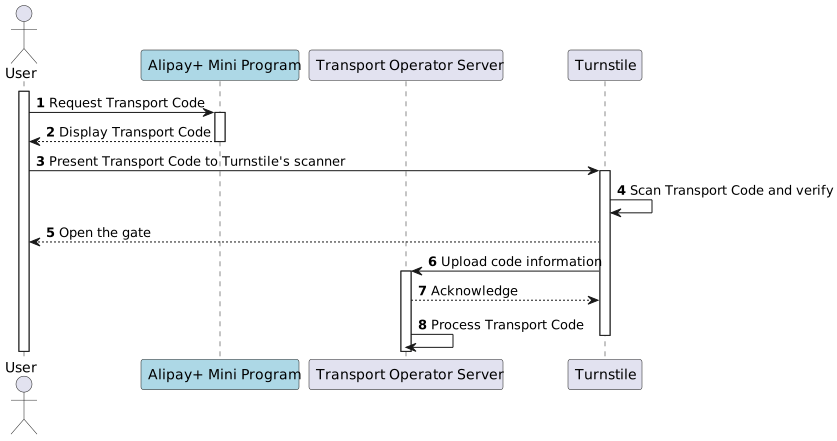
The following figure illustrates the workflow of scanning the Transport Code to start the ride.
Operation steps
- The user requests the Alipay+ mini program to generate a Transport Code.
- The user presents the Transport Code to the turnstile's scanner.
- The turnstile verifies the code value and opens the gate or displays a prompt for the user to board.
- The turnstile uploads the user's code information to the transport operator server. If the upload fails, the user must complete a make-up registration when exiting the station.
Scan the Transport Code again to end the ride
This section introduces how to scan the Transport Code again to end the ride and deduct the fare.
Workflow
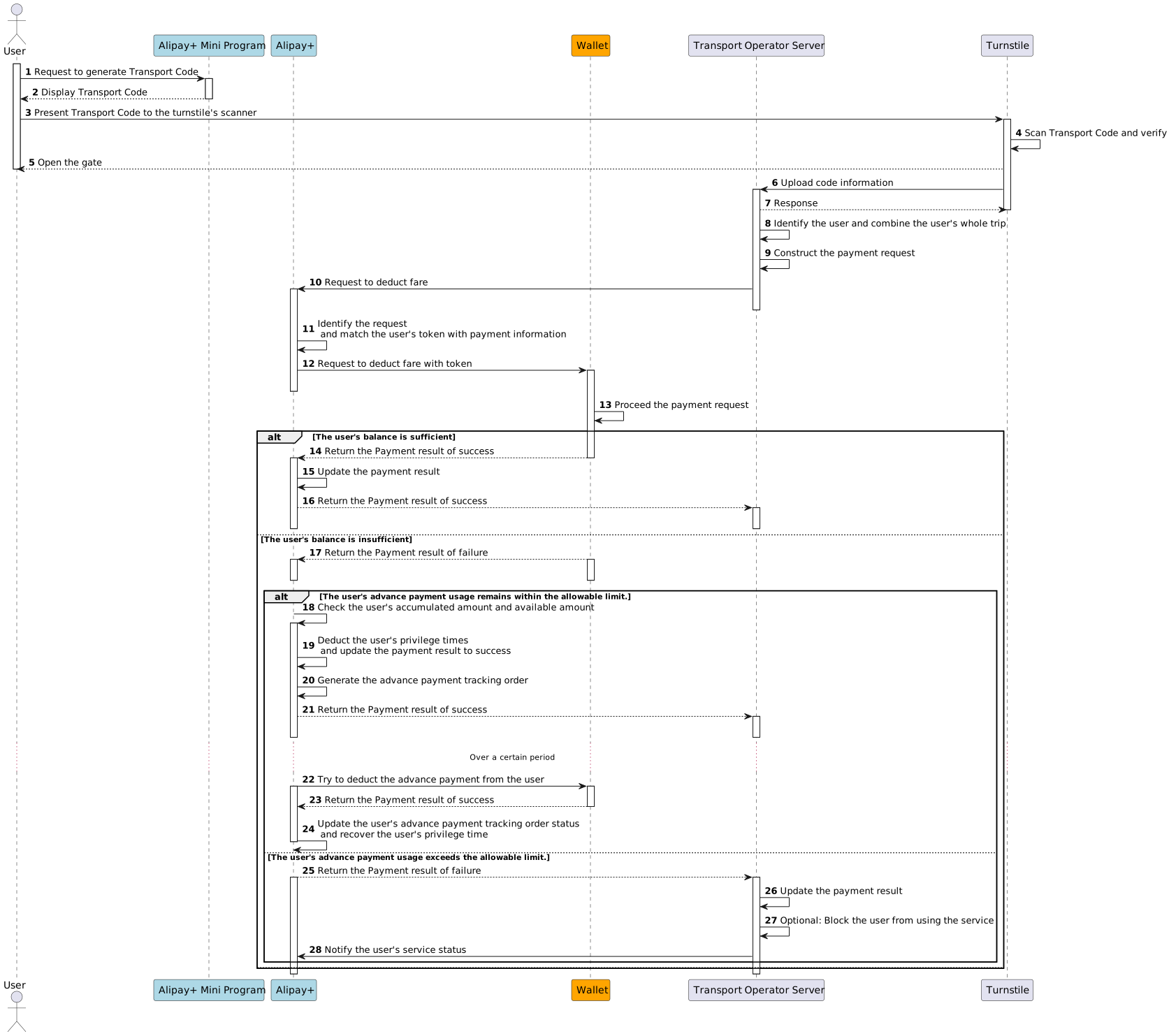
The following figure illustrates the workflow of scanning the Transport Code again to end the ride.
Operation steps
- When the ride is over, the user requests the Alipay+ mini program to generate a Transport Code again.
- The user presents the Transport Code to the turnstile's scanner.
- The turnstile verifies the code value and uploads the code information to the transport operator server.
- The transport operator server creates the payment order and initiates the payment request.
- Alipay+ forwards the payment request to the wallet.
- The wallet inquires about the user's payment method and processes the payment.
- The wallet returns the payment result to Alipay+.
- Alipay+ returns the payment result and notifies the transport operator server.
- If the deduction succeeds, the payment is completed.
- If the deduction fails due to insufficient balance or risk control, Alipay+ pays on behalf of the user and then recovers the amount from the user later. This is called advance payment and advance payment tracking.
Note:
- The advance payment capability and advance payment tracking capability are under the planning of Alipay+ transport code service.
- If the user does not replenish the unpaid amount, they will be blocked from using the Transport Code service on the next ride.
- The limit of the advance payment privilege time is customized by you.
Inquire about the ride history
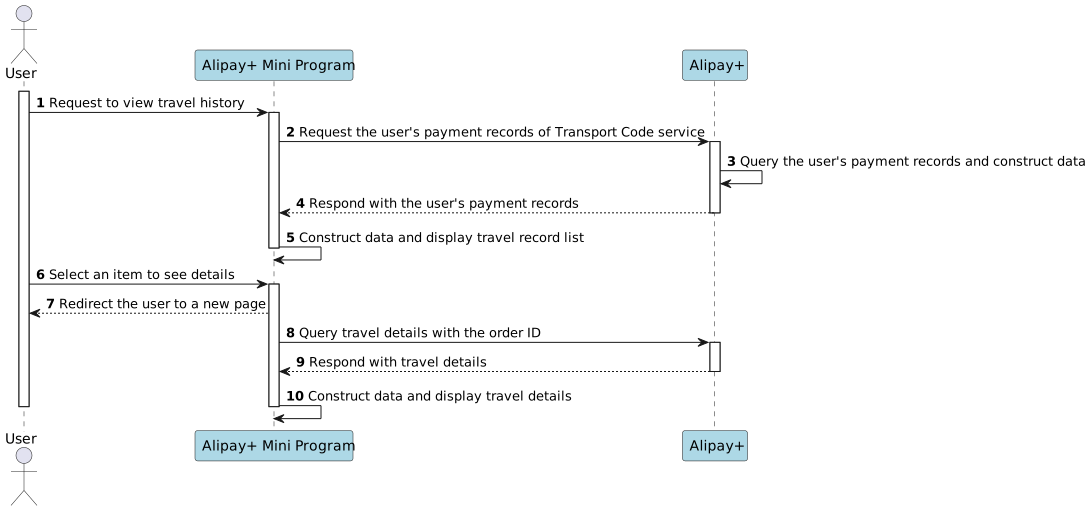
After the trip ends, users can view their ride history in the Alipay+ mini program to review the travel time, payment amount, payment status, and merchant order ID.
Workflow
The following figure illustrates the workflow of inquiring about the ride history.
Operation steps
- The user taps Travel Records under the Transport Code tab in the Alipay+ mini program.
- The user checks the travel record list.
- The user taps on an item to view its details.
Note: Travel records appear only after the fare is deducted successfully.
Suspend the Transport Code service
Users can suspend the Transport Code service when they no longer need it.
Workflow
The following figure illustrates the workflow of suspending the Transport Code service.
Operation steps
- The user taps Settings under the Transport Code tab in the Alipay+ mini program.
- The user selects to suspend the service and submits the request.
- Alipay+ checks if the service can be suspended. If so, the service is disabled.
Note:
- Because the Transport Code service uses the Ride First Pay Later payment, it takes a while to return the suspension result.
- If the user has an unpaid ride order when requesting to suspend the service, Alipay+ rejects the request and reminds the user to pay the fare first.
- If the user needs the service later, they can enable it by tapping Restart on the homepage of the Alipay+ mini program.
- Suspending the service does not remove the Auto Debit agreement. If the wallet wants to remove the agreement for the user or if the service is no longer needed, it can send a request to Alipay+ through the cancelToken and authNotify APIs. Also, the wallet can redirect the user to remove the agreement in Alipay+ Mini Program. For more information, see Redirect to Alipay+ mini program to remove the Auto Debit agreement.
Best practices
Support the user authorization of mobile phone number when enabling the service
For the Transport Code service in Chinese mainland cities, Alipay+ collects and submits user information required by transport operators: user ID, ID type and number (passport or Mainland Travel Permit for Hong Kong and Macau Residents), and mobile phone number.
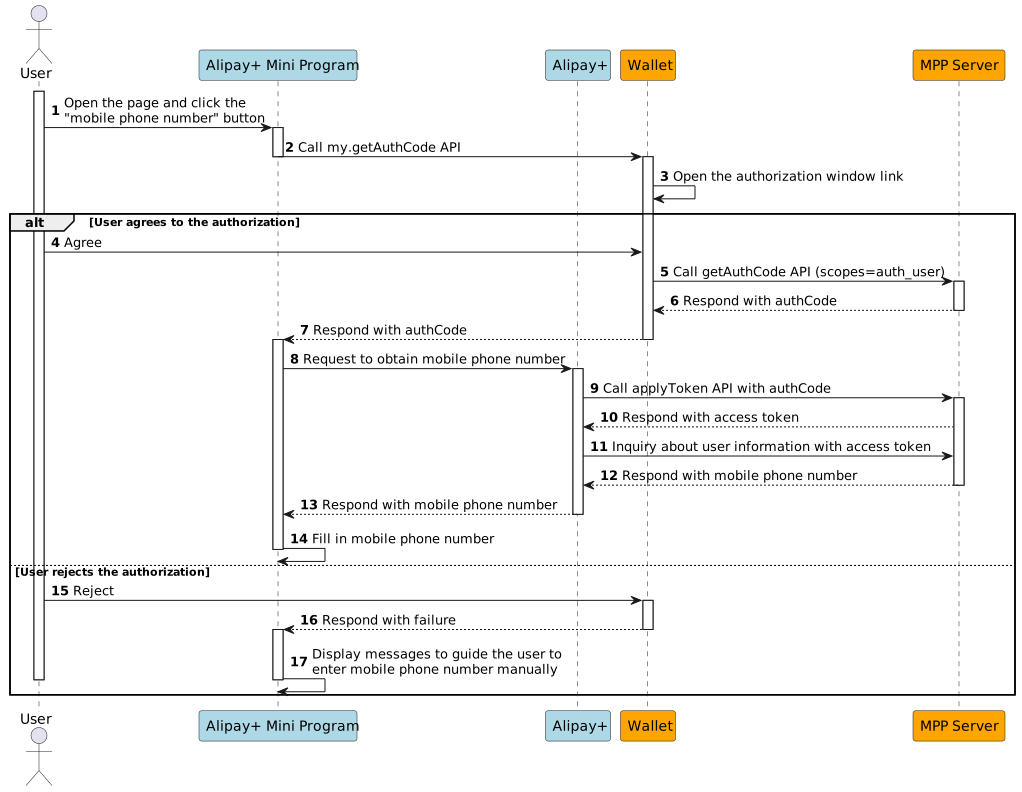
To auto-fill the mobile phone number, use the /v2/users/inquiryUserInfo API. Workflow:
- Alipay+ calls getAuthCode and applyToken to obtain an access token.
- With the access token, Alipay+ calls /v2/users/inquiryUserInfo to retrieve the user's mobile phone number.
The wallet can control the token validity period to reduce the risk of mobile phone exposure.
Note:
- If the user denies authorization, the user needs to enter the mobile phone number manually. Otherwise, the Transport Code service cannot be enabled.
- After the authorization, the user can remove the authorization on the Settings page in the Alipay+ mini program if needed.
Workflow
The following figure illustrates the workflow of authorizing the mobile phone number to Alipay+.
Guide the user to complete eKYC verification
Local wallet regulations require the user to complete eKYC verification and reach a specific eKYC level before making cross-border payments. Otherwise, the payment is rejected.
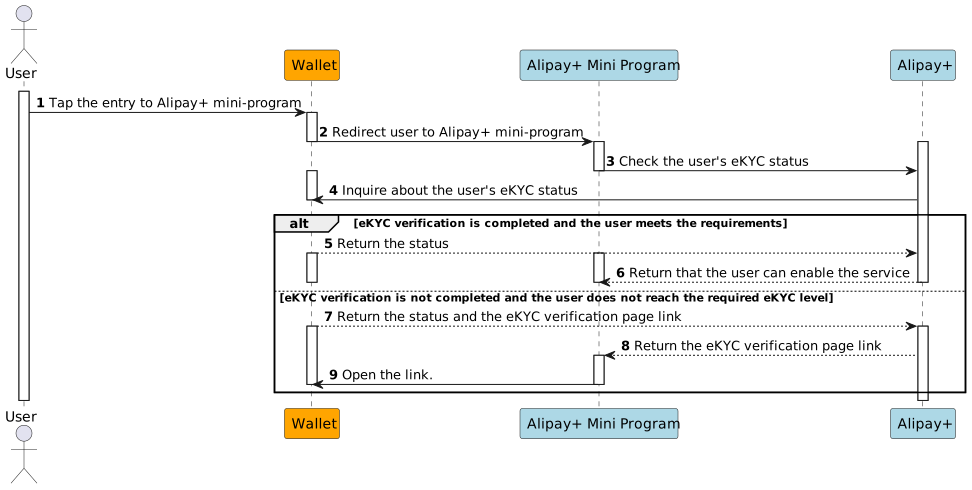
To provide a smooth payment experience, Alipay+ calls alipay.aps.transportation.checkTransitScenario in the service enabling process to check whether the user's eKYC verification is completed.
- If the user has completed the eKYC verification and reached the required eKYC level, Alipay+ guides the user to the next step to enable the service.
- If the user has not completed the eKYC verification or has not reached the required eKYC level, MPP is recommended to return the eKYC page link. Through the eKYC page link Alipay+ will guide the user to complete the eKYC process or upgrade their eKYC level.
Workflow
The following figure illustrates the workflow of enabling the Transport Code service.
Redirect to Alipay+ mini program to remove the Auto Debit agreement
The cross-border transport code service is a Ride First Pay Later service. The fare is deducted after the user's trip/ride ends, which requires the user to authorize the Auto Debit agreement.
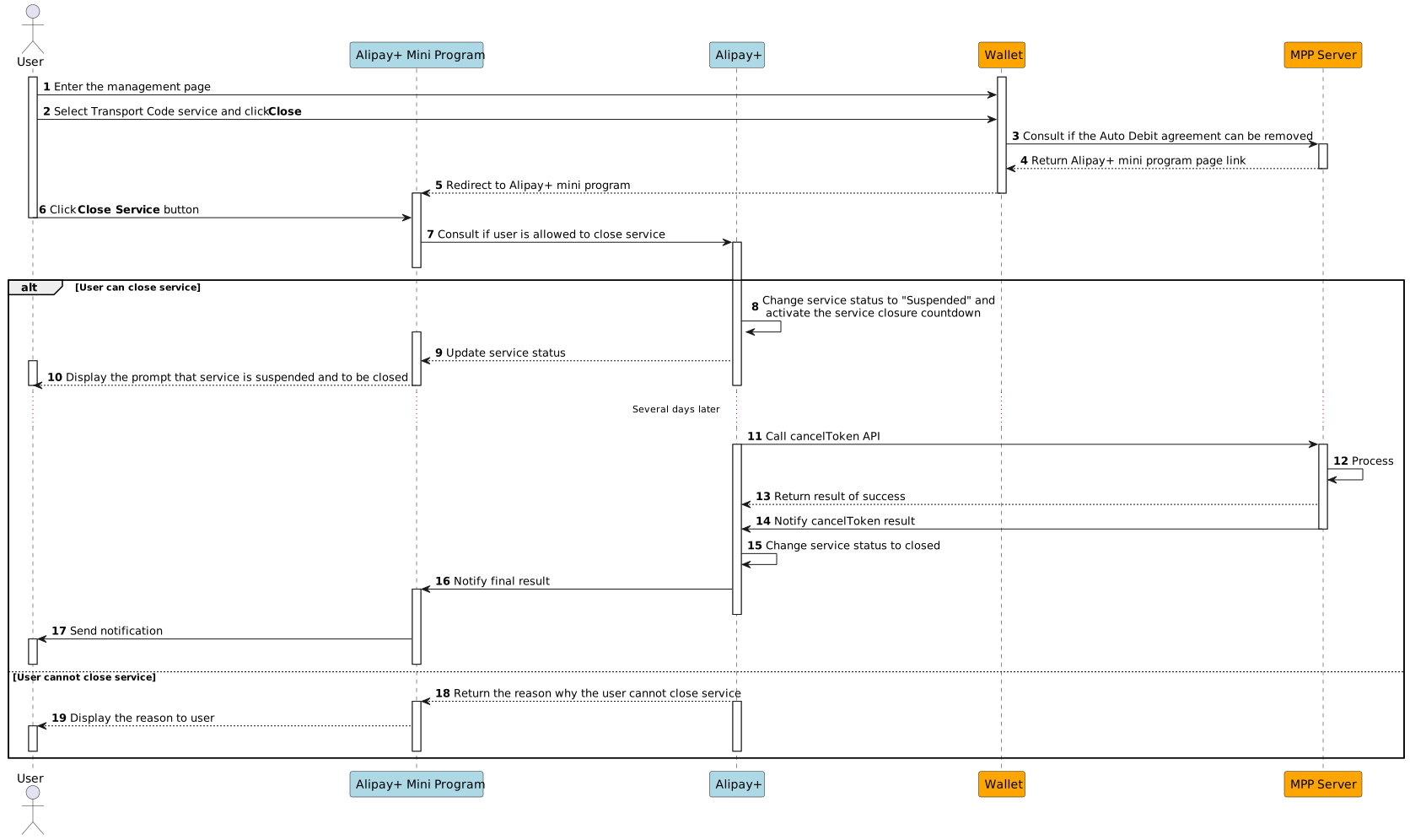
If the user wants to stop using the service, the wallet should provide an entry that lets the user remove the Auto Debit agreement.
It is recommend redirecting the user to the Alipay+ mini program to remove the agreement.
Workflow
APIs and SDKs
The following APIs and SDKs are provided in Transport Code integration:
SDK/API | Description | Reference |
Alipay+ MPP Client SDK | The fundamental SDK for an Alipay+ MPP client. | |
Alipay+ OfflinePay SDK | Integrated with the Alipay+ MPP Client SDK to facilitate the Transport Code service. | |
Universal JSAPIs for mini programs | The JSAPIs to build a mini program. | |
generateTransitCode | A dedicated JSAPI for Transport Code. The mini program calls this API to request Alipay+ OfflinePay SDK to generate the Transport Code. | |
alipay.aps.transportation.checkTransitScenario | This SPI enables Alipay+ to request the wallet to verify if the fare can be normally deducted after the user finishes the ride. | |
/v2/users/inquiryUserInfo | This API enables Alipay+ to acquire the user's mobile phone number if the MPP supports the user to authorize the mobile phone number to Alipay+ when enabling the service. | |
Auto Debit APIs | These APIs enable Alipay+ to deduct the fare after the user finishes the ride. |